Can I make a one-off payment with an active payment plan?
| Before you start: If you have an active payment plan, making a separate one-off payment can risk a duplicate deduction. Use the Pay early feature instead of a separate one-off payment wherever possible, and check with your council first if you're unsure — they hold the final say on your account balance and receipting. |
If you have an active payment plan on your account, making a one-off payment requires extra care. In some cases, a one-off payment may not be the right option — and choosing the wrong path could result in a duplicated deduction or a payment error.
See the following guide for handling a failed payment attempt > A scheduled payment has failed, what happens next?
Why can't I just make a one-off payment at any time?
When an active payment plan exists on your account, scheduled instalments are processed automatically at agreed intervals. If a one-off payment is made in the days leading up to a scheduled deduction, both payments may be processed, resulting in a duplicate deduction from your bank or credit account.
| Tip: It can take up to 5 business days for recent deductions to appear in your bank or credit account statement. A payment may still be processing even if it is not yet visible. |
How does Payble know if a payment has been received?
Payble relies on data provided by your council to confirm when payments have been successfully receipted. This means that there may be a delay between when a payment is made and when it is reflected in Payble.
During this time, the system may not immediately show that a payment has been received, which is another reason why making a one-off payment shortly after another deduction can carry a risk of duplication.
What should I do if I want to pay early?
If you'd like to make a payment ahead of your next scheduled instalment, the recommended option is to use the Pay early feature. This option is available for most plan types and is the safest way to bring forward a payment without risking a duplicate deduction or disrupting your plan.
To pay early:
- Log in to your account via the Payble portal using the authentication method used for creating the plan.
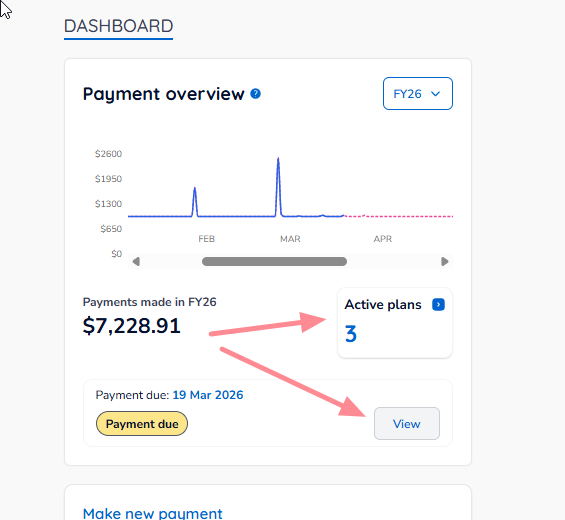
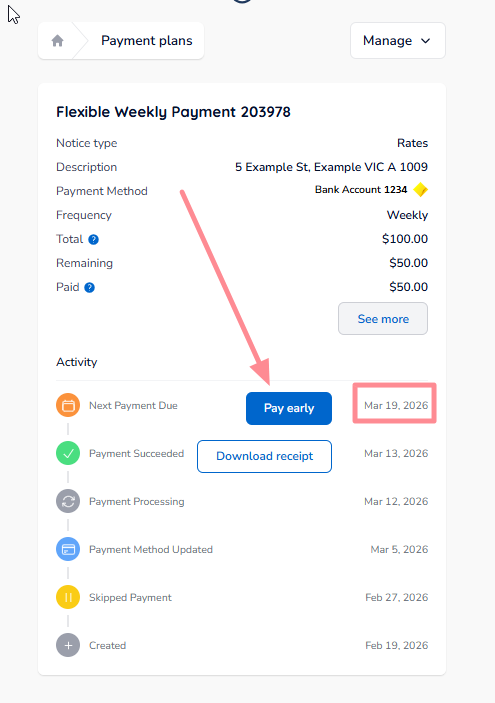
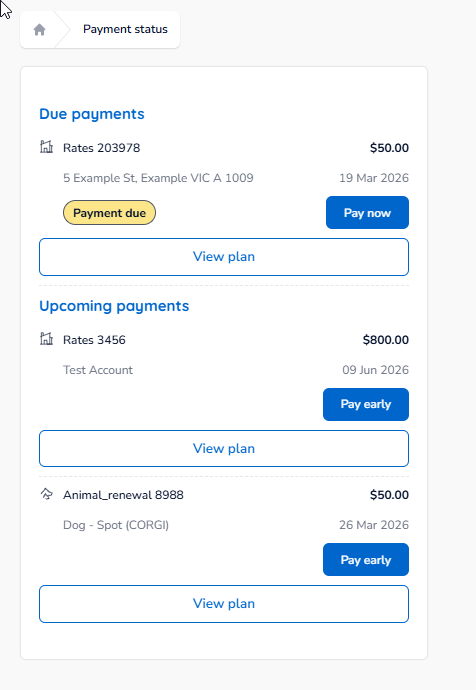
- Navigate to your Active plans or click the View button on upcoming payments.
- Select Pay early or Pay now depending on the option previously picked.
- Follow the prompts to confirm the early payment.
Using this option ensures the system correctly accounts for the payment against your plan schedule and reduces the risk of a duplicated payment.
Who should I contact if I have questions?
For any questions about one-off payments, active plans, or duplicate payment concerns:
Your council is the first and only point of contact.
Payble manages the payment process, but your council controls account balances, receipting of payments, and any next steps if a duplicate payment has occurred.
Was this article helpful?
That’s Great!
Thank you for your feedback
Sorry! We couldn't be helpful
Thank you for your feedback
Feedback sent
We appreciate your effort and will try to fix the article